

How To Break Windows 7 Password Administrator
Although, the world has modernized and people are intended to utilize Windows latest version only if yous are however a Windows vii user and so there is no demand to worry, in that location are a number of people who still dear Windows 7 and adopt to use it for their routine works. So in this scenario forgetting the Windows 7 password is not a big bargain because in this post yous will learn how to break Ambassador password in Windows 7 without login.
Usually, people go confused betwixt the word Administrator and admin for Windows vii. Nevertheless, to brand yourself articulate yous can pronounce information technology as how to break Admin password in Windows vii. Without wasting any time let's explore different working methods for how to break Windows 7 password.
Meridian Windows Password Recovery: iSunshare Windows Password Genius
Windows/macOS, $xix.95
Method 1. Break Windows 7 Administrator Password with Born Ambassador in Safe Mode
Breaking Windows 7 Password with Built-in Administrator in Safe Manner is one of the all-time methods to regain access to your locked Windows vii figurer, but unremarkably, people avoid this method. Afterwards all, they think information technology is a challenging method to reset Windows vii password because they take to select options from the kick menu and they have the self-created opinion that they are unable to do this. If you are not ane of them, so please attempt this method to regain access to your Windows seven estimator.
Advisedlyfollow these simple steps to break Windows 7 Ambassador password.
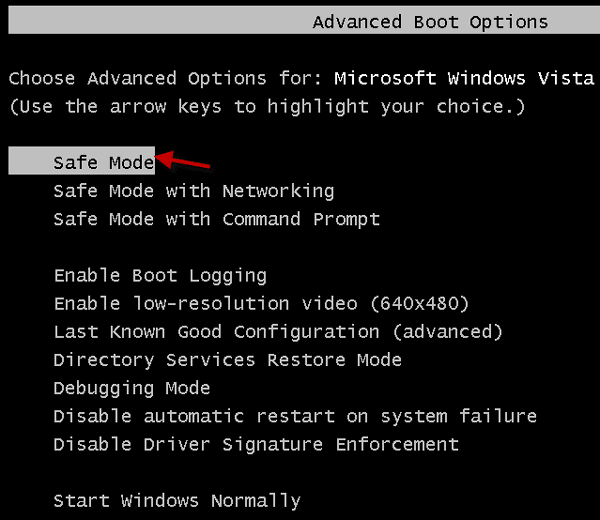
Offset your figurer. Keep pressing F8 until enter into the Windows vii Avant-garde Boot Options. Y'all tin can choose the Safe Mode option using the up and down pointer keys. Subsequently selecting information technology, printing Enter.
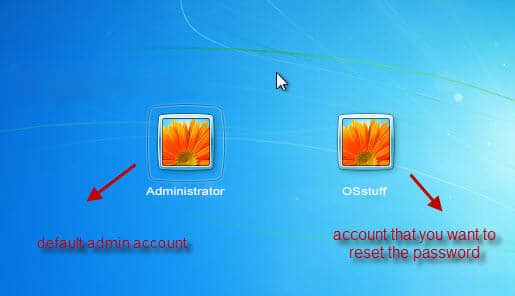
By pressing Enter, Windows volition load its files and show y'all the login screen, here you will run across another account listed with your main admin account named every bit Administrator, click on this to continue.
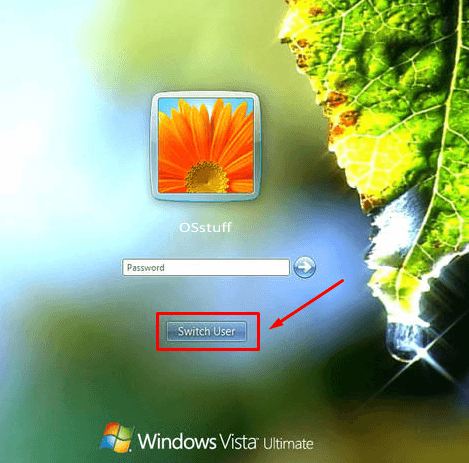
If pressing Enter doesn't evidence you the administrator business relationship, don't worry, you will detect a switch user option beneath, click on Switch User and cull the Administrator account to recover your password.
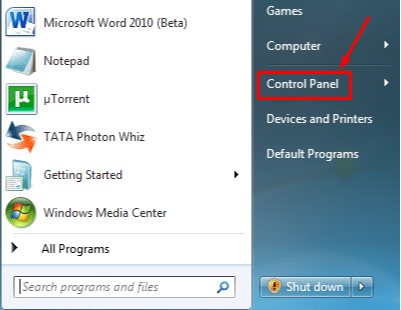
You will be successfully logged into your Windows 7 through the default account. To change your principal admin account password, click on your Windows search box. Either y'all can search Command Console or can find it at the left pane.
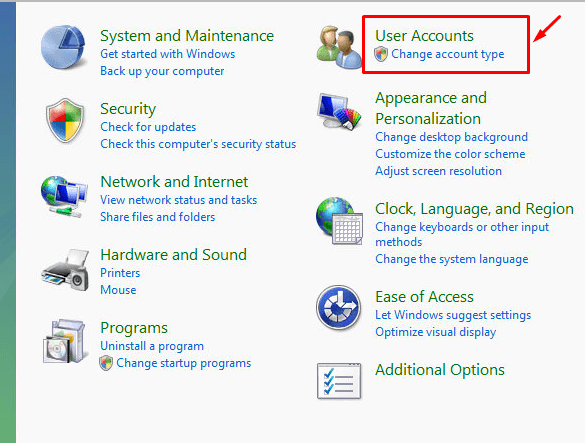
A window with dissimilar actions volition appear because we are concerned with password removal, and then click on User Accounts to change business relationship type or password.
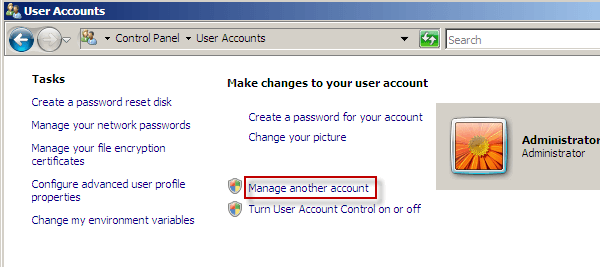
Into User Accounts section, select Manage another account choice.
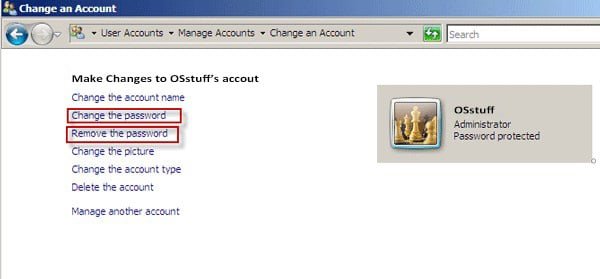
Hither you tin make changes to your master account. At present it's upward to you lot to modify the password or Remove the password, whatever yous want to practice, click on that option respectively.
After successfully breaking your forgotten Windows 7 password, you tin hands unlock your Estimator/laptop with the new password.
Method 2. Break Windows 7 Ambassador Password Using Windows Password Recovery
Likewise Windows itself provided methods, there are other third-party methods that truly help you. iSunshare Windows Password Genius is one of those powerful ways. It is an incredibly simple, constructive, and powerful working Windows password recovery tool to break Windows 7 password. You can download and install it on an accessible calculator.
Free Download Buy Now
Follow these steps to break Windows 7 password without login now:
Insert your USB drive or CD/DVD drive to Create a Windows 7 Password Recovery disk. Cull either USB Device or CD/DVD.
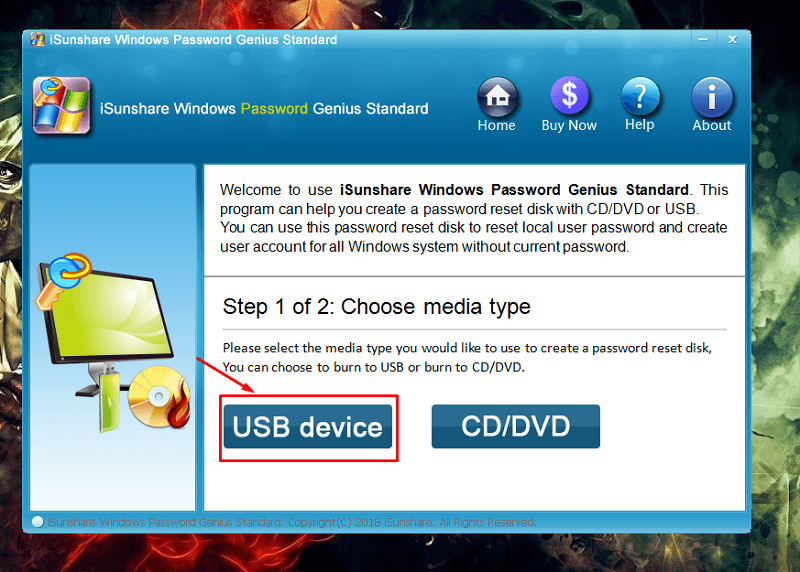
Select your USB/CD drive from the dropdown-downward and click on Brainstorm Burning to beginning the burning process.
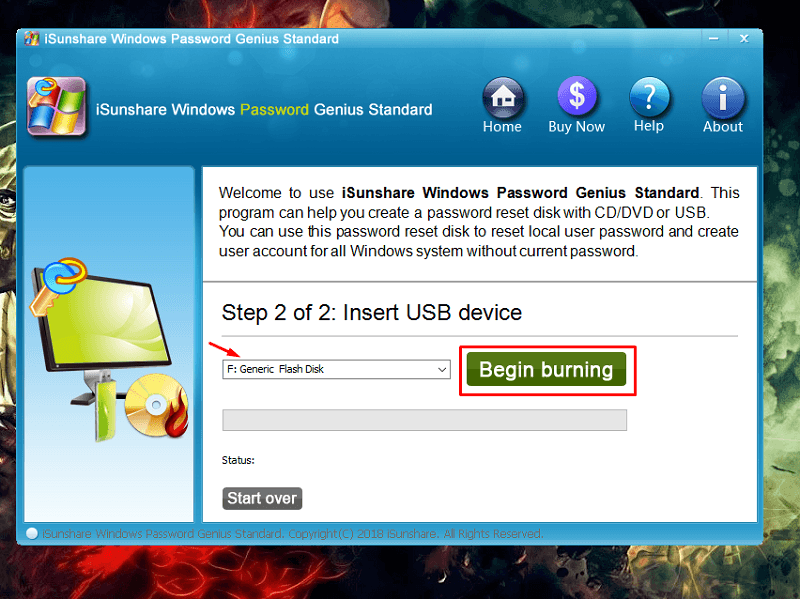
Afterward the burning is successfully finished, detach your USB drive from the supporting calculator, insert information technology into the locked estimator/laptop, and restart to boot your Windows vii from the USB drive. iSunshare Windows Countersign Genius volition appear with an attractive interface. Choose Windows 7 from the listing.
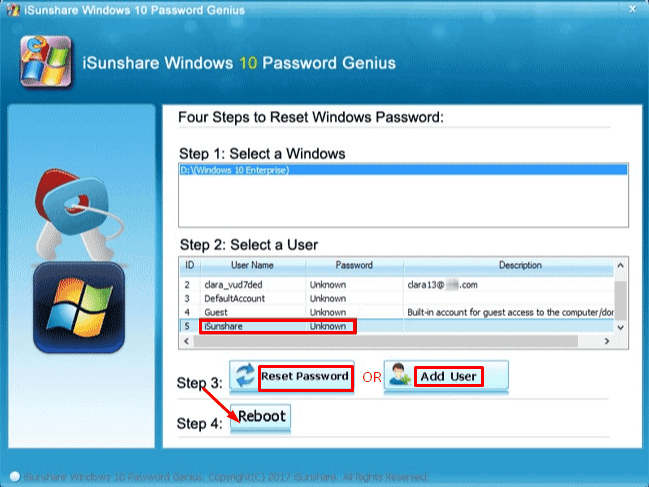
All active user accounts of Windows 7 volition be displayed on the screen. Click a user admin account for which yous want to suspension the password.
Because we will remove the password so click on the Reset Countersign option, a confirmation message will appear, click on Yeah to proceed with the password removal process.
Information technology will immediately remove the administrator business relationship password of your Windows 7, and the password field will be shown as Blank on the iSunshare Windows Countersign Genius screen instead of unknown.
Click on Reboot to regain admission to your Windows 7 computer. Hit the Yep push button also to ostend the process.
After rebooting, you tin can sign in to your Windows 7 computer without entering a countersign and able to set your new password from control panel settings. You can likewise read our iSunshare Windows Countersign Genius review here.
Method 3. Break Windows 7 Administrator Password Using System Repair Disc
In that location are several methods that yous tin can choose to bypass your Windows seven password, and 1 of the most effective strategies to break Windows 7 administrator account password is using a organisation repair disk. People think that this method is a difficult i, merely in that location is no special software or skill required to go through with this method, just follow the steps below and in minutes, you will be able to reaccess your Windows 7 without any countersign.
To get started with break Windows vii Password using a system repair disc, follow the steps below:
Commencement of all, you should have a USB or CD/DVD drive to boot from. If you lot are using a CD/DVD, and then wait for a message labeled as press any key to boot from CD or DVD, or if you are using a bootable USB drive, press the boot central from your keyboard to enter into the kicking menu.
So the first pace is, create a bootable USB drive or DVD/CD on another computer.
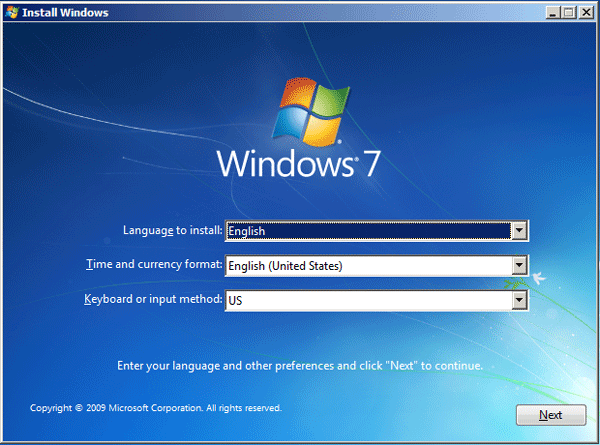
Insert this bootable USB drive into your locked Windows seven computer and printing the commencement button to reboot. Information technology will prove a press any key to keep notification on the Windows seven screen. The Windows installation GUI will appear, click on Next to view more than options.
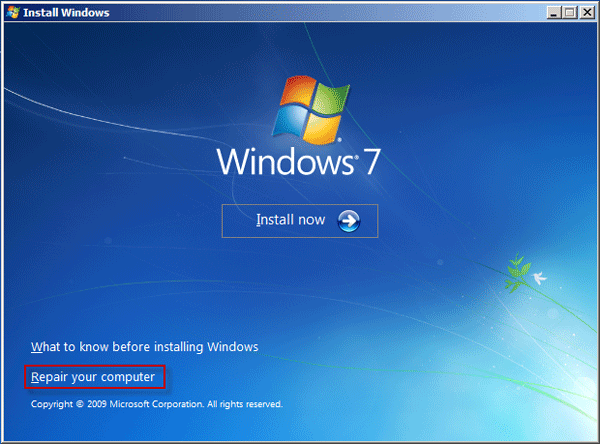
Choose the Repair your Figurer option from the different actions and click on information technology instead of clicking on the install push.
Here you will encounter two available Windows vii recovery options. The first one is, use the organisation recovery tool to recover password, and the 2nd i is, restore Windows 7 to its default manufacturing plant settings. Choose the first radio choice, and the setup program will locate your Windows installation and click on Next.
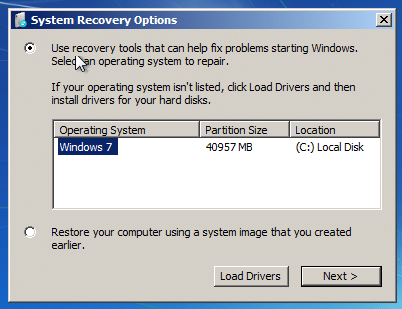
From many options, choose the Command Prompt action and hit the Restart button to reset your password.
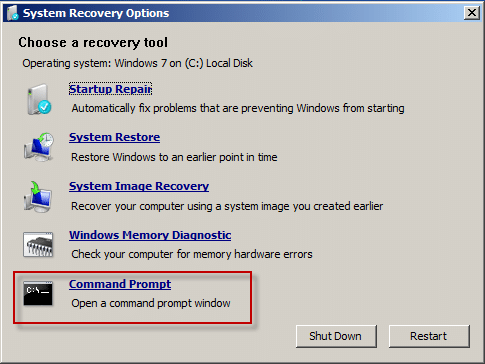
Here we accept to make changes in system files, but before making changes in the sethc.exe file, make a fill-in if something went incorrect. To create a re-create of it, blazon the following control on cmd in the C: \ directory:
copy C:\Windows\System32\sethc.exe C:\ 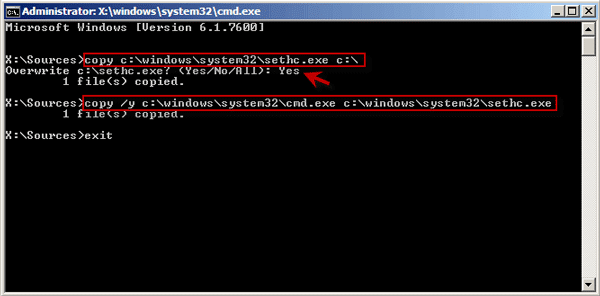
At present, to replace the"sethc.exe" file with the"cmd.exe" file, enter the following command.
copy /y C:\Windows\System32\cmd.exe C:\Windows\System32\sethc.exe The switch / y confirms that the file "sethc.exe" is overwritten.
Enter "go out" to close the cmd,remove the bootable device from the organization, and restart your laptop/computer. Every bit soon as the Windows 7 login screen appears, striking the Shift key v times to enter the Command prompt again.
Now its time to reset your Windows 7 countersign, enter the following command to reset a new password for your Windows seven.
net <username> <new pasword> 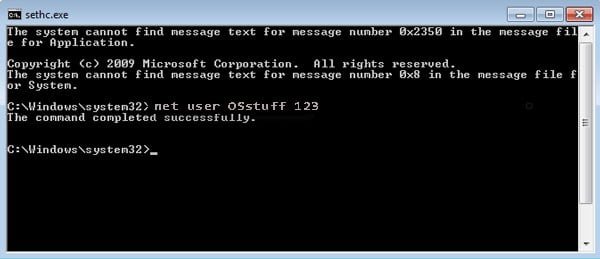
Remember that we created a backup of "sethc.exe" file to avoid any mishappening; now when the password is successfully restored, reboot your system over again and adhere this bootable USB into the arrangement to enter into the control prompt again. Type this control to identify it back to its original location.
copy /y C:\sethc.exe C:\Windows\System32\sethc.exe That's information technology, exit the cmd and restart your Windows 7 to log in with the new countersign.
Conclusion:
Hope this commodity truly helped you to break Windows 7 countersign without login. If yous faced any kind of problem agreement this post or didn't get what you lot were looking for, please do let united states know through the annotate section so that we can help you lot in a better way.
Costless Download Buy At present
Source: https://www.softwalla.com/how-to-break-administrator-password-in-windows-7-without-login/
Posted by: aguilarsals1979.blogspot.com
0 Response to "How To Break Windows 7 Password Administrator"
Post a Comment