

How To Crack Windows 8 Password Without Software
How to Reset Forgotten Windows 8 Countersign without Any Software
Did you forget your Windows viii user account countersign? Are you stuck with no access to an administrator account? Do you lot need to get into your kid's (or an employee's) computer for whatsoever reason? If then, there is an easy mode to do it. and all it requires is a Windows eight Recovery Drive.
If you don't have a Windows eight Recovery Drive, you can create 1 on another Windows 8 PC which you lot can admission, by following this guide: How to Create a Recovery Bulldoze in Windows 8. Here I will try to make an easy to follow tutorial that will be useful for novice users equally well as professionals to reset forgotten Windows 8 password without using any third-political party software.
How to Reset Forgotten Windows 8 Password?
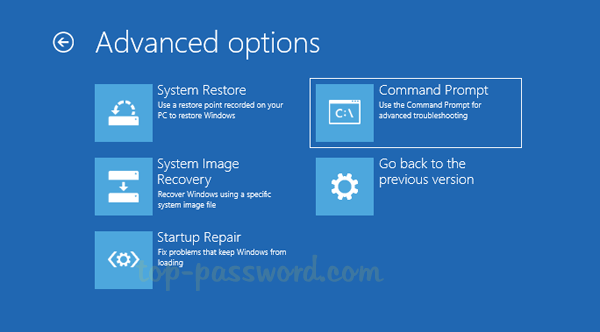
- Insert the Windows eight Recovery Drive into your locked machine and kick the computer from it, and after that y'all'll meet the Troubleshoot menu. click Advanced options.

- On the next screen, click the Command Prompt option to open a Command Prompt window.
- Type diskpart command and press Enter. Next blazon list vol and press Enter, yous'll see a list of your disk partitions, from which you tin hands find your Windows installation partition. In our case D is the bulldoze letter of my Windows 8 installation.
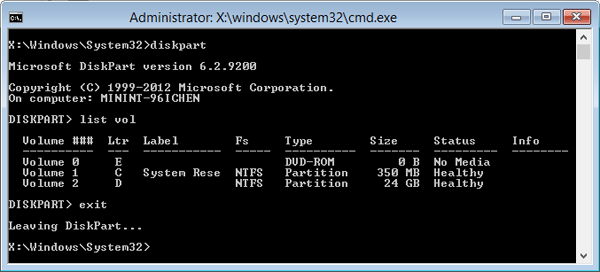
- Type exit command to exit the DiskPart utility.
- Next enter the following command 1 past one. Make sure to supersede D in the first command to the appropriate drive letter for your Windows partition, if it'south different in your case.
D: cd windows cd system32 ren Utilman.exe Utilman.exe.bak copy cmd.exe Utilman.exe
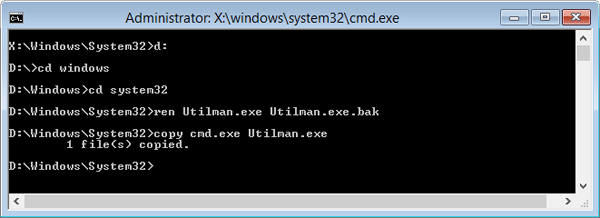
- These commands volition replace the Utilman.exe (Ease of Access) with the Command Prompt (cmd.exe). Remove the Windows 8 Recovery Drive and reboot the system.
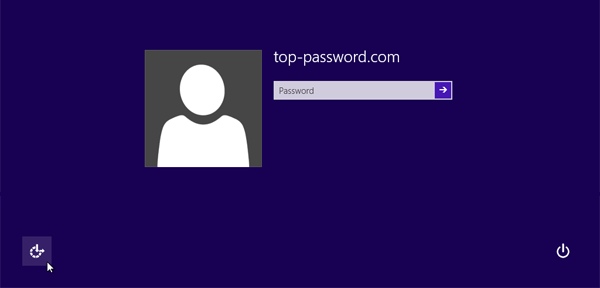
- Once booted to the login screen, click the Ease of Access push at the lesser left corner. Information technology volition open up a Command Prompt window instead of the Ease of Access card.
- Type net user command and press Enter, it volition listing the exact names of all the user accounts bachelor in your Windows 8 system.
- Enter the control below to reset a lost or forgotten password. In this case, we will exist changing top-password'due south password to 123456.
net user meridian-password.com 123456
Replace tiptop-password.com with the name of your user business relationship.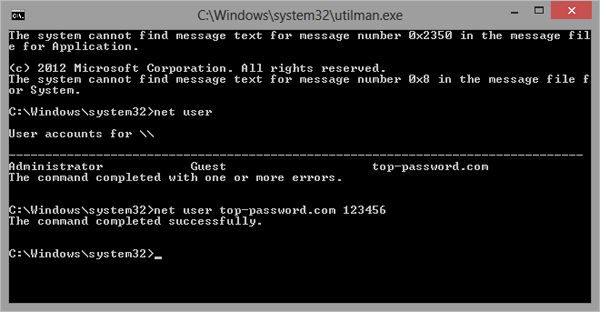
- Type get out command and press Enter. You lot'll return back to the login screen.
- At present you lot should be able to log into your PC using the new countersign.
- After getting into Windows 8, please think to rename the Utilman.exe.bak back to Utilman.exe.
- That's information technology – you lot have successfully reset your forgotten Windows 8 password.
This fox isn't as simple as a few mouse clicks but equally long as you lot can follow the instructions advisedly, you lot should accept no trouble resetting your Windows eight password. However, using the tertiary-party software is a ameliorate choice in most situations. PCUnlocker utility is a unique recovery software that enables you to reset forgotten Windows 8 password for local account as well every bit Microsoft business relationship.
Related Manufactures

Source: https://www.top-password.com/knowledge/reset-forgotten-windows-8-password.html
Posted by: aguilarsals1979.blogspot.com
0 Response to "How To Crack Windows 8 Password Without Software"
Post a Comment